One tap, and the rest is handled
Most days need nothing.
Food is assumed to be on plan, so a normal day asks for nothing. Steps and workouts come from Apple Health. In the evening there's one question, "How was today?", and "All good" is a single tap. If you forget, the day still counts as fine.
- 01One tap in the eveningAll good says the day went to plan.
- 02Apple Health does the restSteps and workouts fill in on their own, and weight too if you weigh in.
- 03On your iPhone onlyNo account, no servers.
Email me when it's out One note when it's on the App Store. Opens your mail app, and nothing is stored on this site.
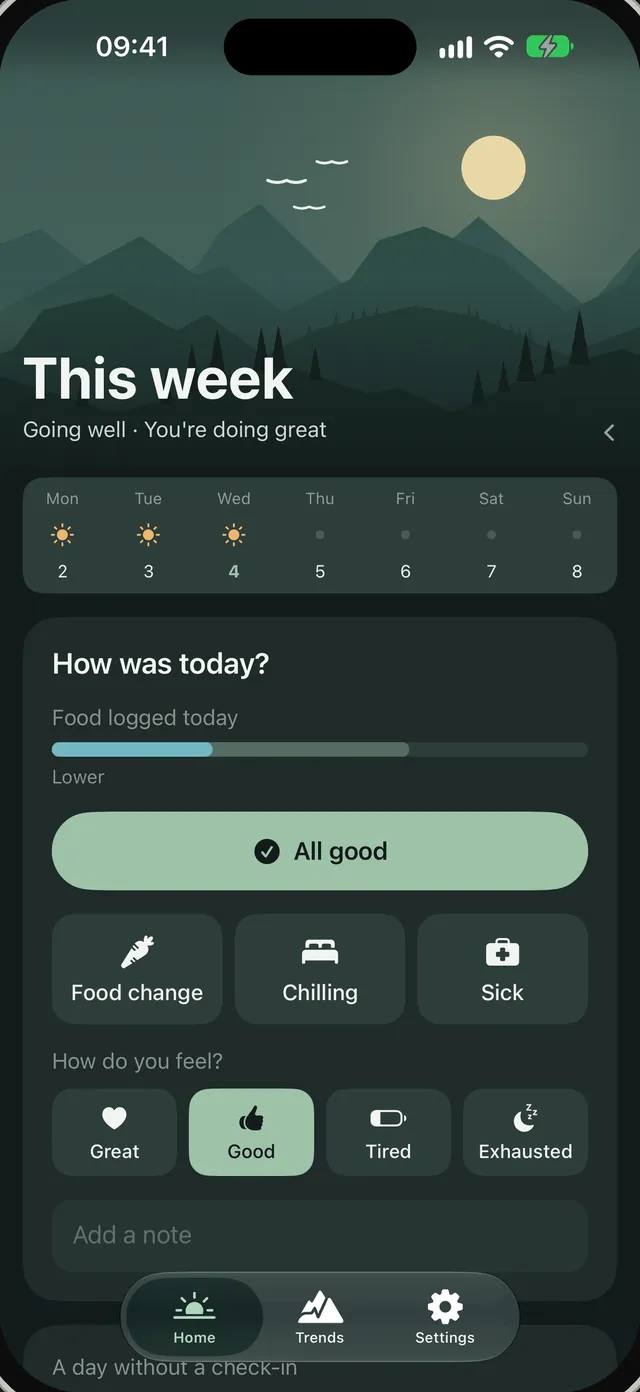
- All good
- Steps from Apple Health
- Strength training counted
- Clear evening: the week is going well
How your week looks
A rough week brings a bit of rain. It passes, and nothing is marked against you.
Your week is a landscape. A clear evening when it's going well, clouds when something is a little off, rain for a rough patch that passes. Each card plays its scene as it comes into view.
Time off
Holidays and sick days never count against you.
Time off pauses your goals, so nothing counts as missed. No goals, no reminders, and Steps and workouts still show as plain facts.
Can't follow your plan for a while? Mark the days as time off and your goals step aside until you're back. Time off is never graded.
Kind by design
Any effort counts.
HealthPeaks is on your side. It shows what went well first, and a hard week shows up as rain that clears.
60% is a good week
Even five minutes builds a habit, so small efforts count. Three strength sessions planned? Two make a good week.
Each goal forgives one slip
One heavy lunch in a great week should leave you feeling good.
A lighter day counts double
When food ran over, a lighter day brings you back to on plan faster than the sums say.
Words like Higher or Gently downhill, never exact numbers. Rough logging can't back up exact totals.
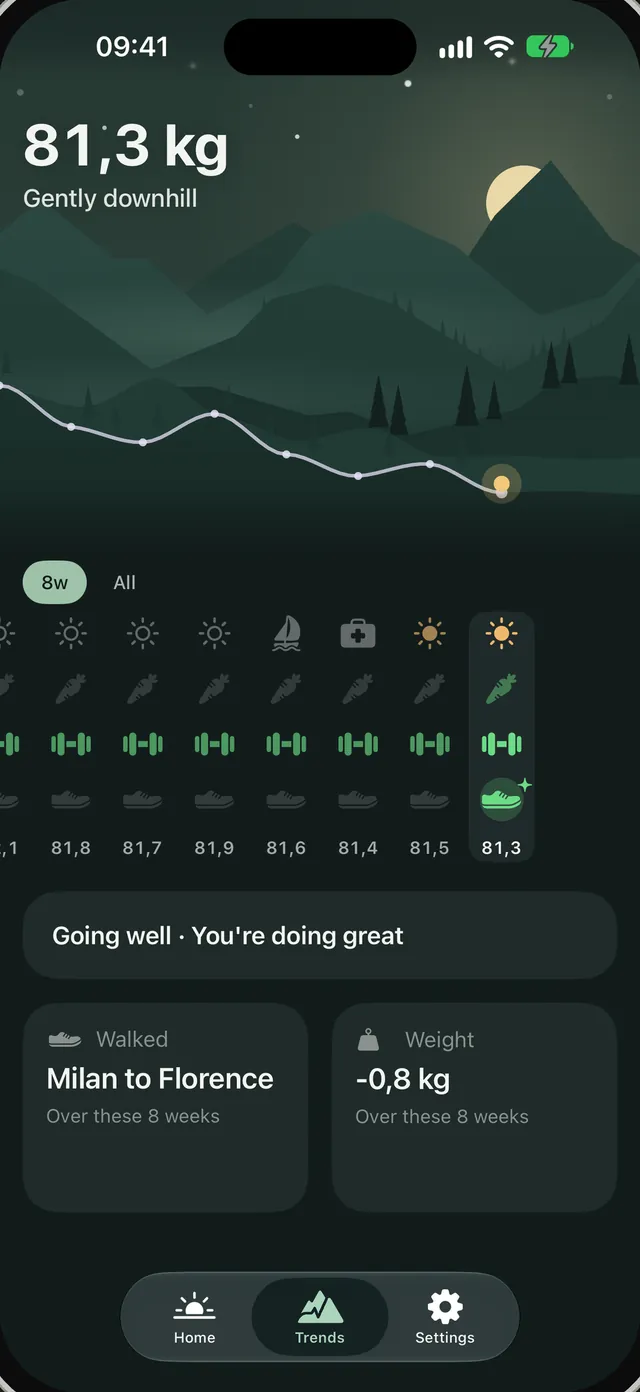
Milan to Florence
A line about your week, from your notes
Trends
Your weeks, as a trail.
Step back and see your weeks side by side as a trail through the mountains. Each week shows how Food, Strength training and Steps went, in the same colours as Home. Weight is optional, and if you weigh in, it shows where those habits lead. Your steps add up to journeys, like Milan to Florence.
Your notes are part of it too. On iPhones with Apple Intelligence, a finished week with notes worth remembering gets a short line about what happened, written on the phone. From Tuesday, this week gets a line so far. Without it, you see the usual line.
Same colours on every page, and always a word or an icon beside them.
The full tour
Take a walk through it.
Four moments from a normal week in the app. Keep scrolling to walk through them.
01One tap, and the sky settles
02Off plan? Tap the meal
03Slide back through your weeks
04Swipe back through your days
Email me when it's out One note when it's on the App Store. Opens your mail app, and nothing is stored on this site.
Private by design
Everything stays on your iPhone.
Your check-ins, notes and settings live on your phone. The developer never receives them.
Apple Health access is yours to give or take back any time in Settings.
- No accountOpen the app and start. There's nothing to sign up for.
- No serversHealthPeaks has no servers to send your data to.
- No trackingNo analytics, no ads, and this site has none either.
- Apple Intelligence stays on the deviceOn iPhones that have it, a short recap of a past week is written on the phone, from your notes. Without it, the app works the same.
Export and backup
Your data, your way.
Take your weeks out, bring old ones in, or keep a copy. It all happens on your iPhone, and the app never uploads anything.
Look at it with an AI chat
Export the last 8 weeks, 6 months or everything, with your notes in or out. Copy it as text or share the files, then read it with your favourite AI chat, or on your own.
Bring in your history
Kept track in a spreadsheet or another app? HealthPeaks copies instructions for an AI chat that turn it into a file the app can restore.
Back up to Files
Save a backup file through Files and restore it on a new iPhone. Steps, workouts and weight come back from Apple Health on their own.
Questions
Good to know
Do I have to log my food?
No. HealthPeaks assumes a normal day of eating, so a day you don't answer still counts as fine. When a day went differently, tap Food change, then pick the meal: Lighter, Bit heavier or Heavy. If you already track calories in another app, HealthPeaks can read them from Apple Health once you turn that on in Settings.
Does it need Apple Intelligence?
No. Everything works without it. On iPhones with Apple Intelligence, past weeks with notes also get a short recap, written on the device. Without it, you see the usual status line instead.
Which apps work with it?
HealthPeaks reads Apple Health, so it works with apps that write there. Strength training comes from Hevy, Apple Fitness and others. You can also mark a day as trained by hand. Steps and Weight come from Apple Health too, and calories from a food app if you turn that on.

HealthPeaks is almost here.
A calm place to keep an eye on your week. We'll have the App Store link here when it's ready.
Email me when it's out One note when it's on the App Store. Opens your mail app, and nothing is stored on this site.